배치서빙
특정 모델을 배치서빙 파이프라인에 넣어 예측값을 받아옴
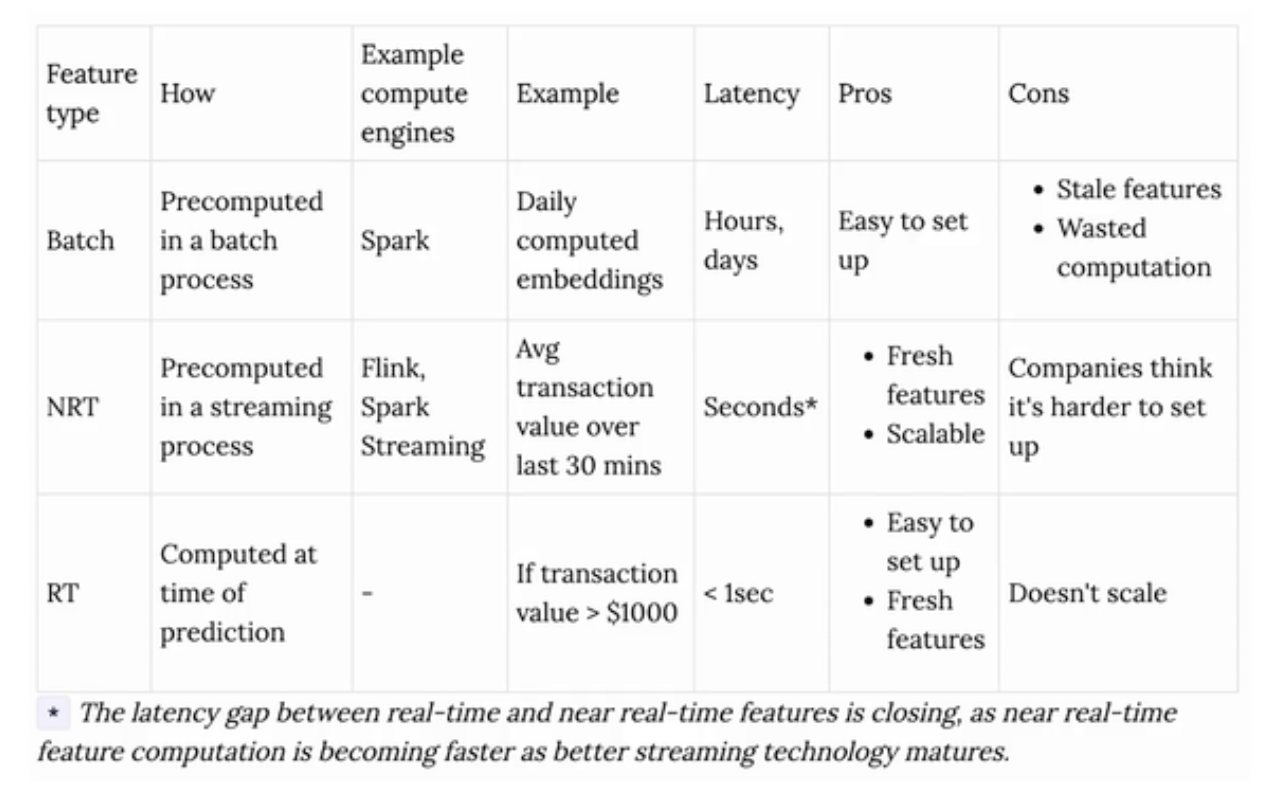
시간이나 일단위는 Batch
1초 이하는 realtime serving
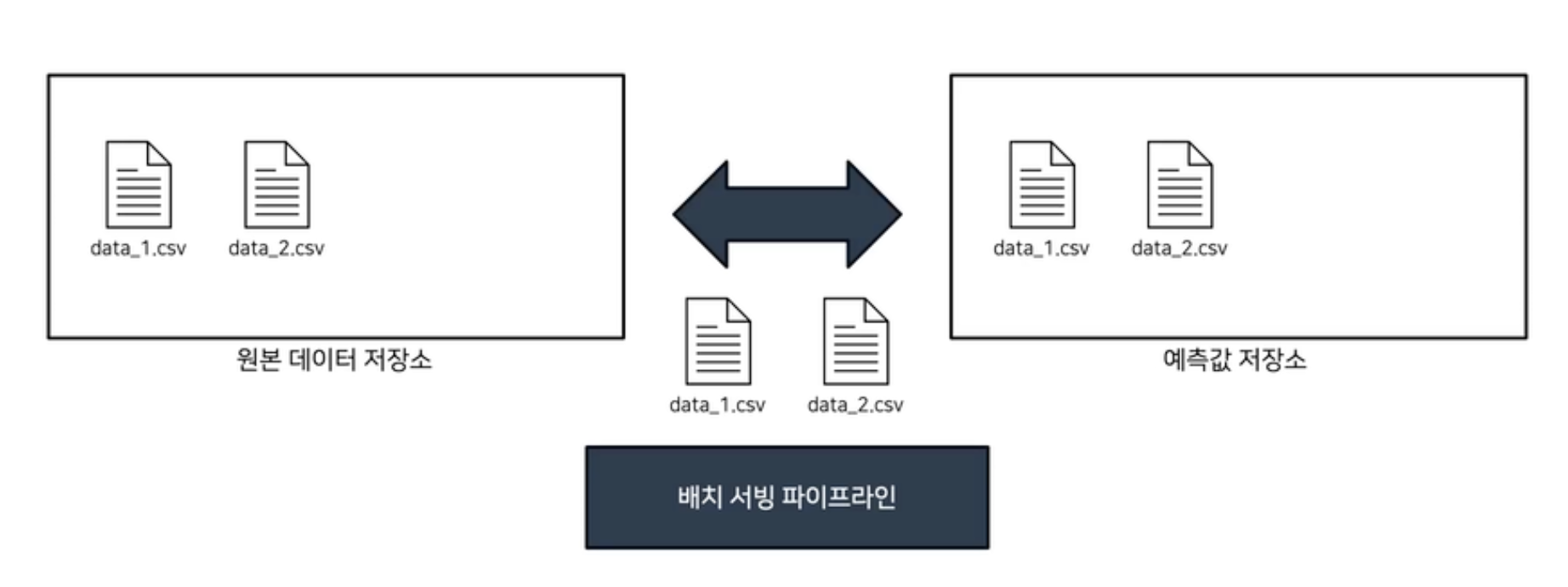
배치 데이터 생성
#
# upload data to minio
#
bucket_name = "not-predicted"
object_name = datetime.now().strftime("%Y-%m-%d %H:%M:%S")

if not client.bucket_exists(bucket_name):
    client.make_bucket(bucket_name)

client.fput_object(bucket_name, object_name, "batch.csv")
이전에 진행한것처럼 진행.
object의 이름은 올린 시간 분 초로 한 후 데이터를 업로드
없다면 버킷을 만들고 업로드
배치서빙
def predict(run_id, model_name):
    #
    # load model
    #
    clf = mlflow.pyfunc.load_model(f"runs:/{run_id}/{model_name}")

    #
    # minio client
    #
    url = "0.0.0.0:9000"
    access_key = "minio"
    secret_key = "miniostorage"
    client = Minio(url, access_key=access_key, secret_key=secret_key, secure=False)

    #
    # get data list to predict
    #
    if "predicted" not in client.list_buckets():
        # 최초 실행시 predicted bucket 생성
        client.make_bucket("predicted")
    not_predicted_list = [objects.object_name for objects in client.list_objects(bucket_name="not-predicted")]
    predicted_list = [objects.object_name for objects in client.list_objects(bucket_name="predicted")]
    to_predict_list = []
    for not_predicted in not_predicted_list:
        if not_predicted not in predicted_list:
            to_predict_list += [not_predicted]

    #
    # predict
    #
    for filename in to_predict_list:
        print("data to predict:", filename)
        # download and read data
        client.fget_object(bucket_name="not-predicted", object_name=filename, file_path=filename)
        data = pd.read_csv(filename)

        # predict
        pred = clf.predict(data)

        # save to minio prediction bucket
        pred_filename = f"pred_{filename}"
        pred.to_csv(pred_filename, index=None)
        client.fput_object(bucket_name="predicted", object_name=filename, file_path=pred_filename)


if __name__ == "__main__":
    from argparse import ArgumentParser

    parser = ArgumentParser()
    parser.add_argument("--run-id", type=str)
    parser.add_argument("--model-name", type=str, default="my_model")
    args = parser.parse_args()

    #
    # predict
    #
    predict(args.run_id, args.model_name)
predict와 notpredict를 비교하여 notpredict에서 predict에 없다면 예측 후 저장하는 과정
다른사람들도 모델을 사용하며 서빙할 수 있도록 image를 서빙
docker build -t batch_predict -f batch.Dockerfile .
docker 파일이 많아 질 경우를 대비 -f를 사용
docker run -it batch_predict MLFLOW RUN ID
(myenv) (base) dinoqos@jangjeong-uui-MacBookAir section1 % docker build -t batch-serving -f batch.Dockerfile .
[+] Building 18.2s (12/12) FINISHED                                 docker:desktop-linux
 => [internal] load build definition from batch.Dockerfile                          0.0s
 => => transferring dockerfile: 386B                                                0.0s
 => [internal] load metadata for docker.io/amd64/python:3.9-slim                    1.5s
 => [auth] amd64/python:pull token for registry-1.docker.io                         0.0s
 => [internal] load .dockerignore                                                   0.0s
 => => transferring context: 2B                                                     0.0s
 => [1/6] FROM docker.io/amd64/python:3.9-slim@sha256:51c781cd11dd1f2a95e2bef833a5  0.0s
 => [internal] load build context                                                   0.0s
 => => transferring context: 2.36kB                                                 0.0s
 => CACHED [2/6] WORKDIR /usr/app/                                                  0.0s
 => CACHED [3/6] RUN pip install -U pip &&    pip install mlflow==2.3.2 boto3==1.2  0.0s
 => [4/6] COPY requirements.txt requirements.txt                                    0.0s
 => [5/6] RUN pip install -r requirements.txt                                      13.1s
 => [6/6] COPY local_predict.py predict.py                                          0.0s
 => exporting to image                                                              3.5s
 => => exporting layers                                                             3.5s
 => => writing image sha256:acccdf80d068eafb0b135f26874367b15e4849009610740ab5e541  0.0s
 => => naming to docker.io/library/batch-serving                                    0.0s

What's Next?
  View a summary of image vulnerabilities and recommendations → docker scout quickview
(myenv) (base) dinoqos@jangjeong-uui-MacBookAir section1 % docker images
REPOSITORY                        TAG       IMAGE ID       CREATED          SIZE
batch-serving                     latest    acccdf80d068   18 minutes ago   1.16GB
05_model_registry-mlflow-server   latest    424be2774d1b   2 days ago       1.13GB
mlflow-server                     latest    86b81958f80b   6 days ago       963MB
03_experiment-mlflow-server       latest    4f01cd2005e2   6 days ago       963MB
reproduce                         latest    6eaff9538a5c   8 days ago       531MB
minio/minio                       latest    81f7d6495208   12 days ago      147MB
postgres                          14.0      01b2dbb34042   2 years ago      354MB
(myenv) (base) dinoqos@jangjeong-uui-MacBookAir section1 % docker run batch-serving 9c067f37a61246ee9bd7b4ff36c7f2df
WARNING: The requested image's platform (linux/amd64) does not match the detected host platform (linux/arm64/v8) and no specific platform was requested
Traceback (most recent call last):
  File "/usr/local/lib/python3.9/site-packages/urllib3/connection.py", line 174, in _new_conn
    conn = connection.create_connection(
  File "/usr/local/lib/python3.9/site-packages/urllib3/util/connection.py", line 95, in create_connection
    raise err
  File "/usr/local/lib/python3.9/site-packages/urllib3/util/connection.py", line 85, in create_connection
    sock.connect(sa)
ConnectionRefusedError: [Errno 111] Connection refused

During handling of the above exception, another exception occurred:

Traceback (most recent call last):
  File "/usr/local/lib/python3.9/site-packages/urllib3/connectionpool.py", line 715, in urlopen
    httplib_response = self._make_request(
  File "/usr/local/lib/python3.9/site-packages/urllib3/connectionpool.py", line 416, in _make_request
    conn.request(method, url, **httplib_request_kw)
  File "/usr/local/lib/python3.9/site-packages/urllib3/connection.py", line 244, in request
    super(HTTPConnection, self).request(method, url, body=body, headers=headers)
  File "/usr/local/lib/python3.9/http/client.py", line 1285, in request
    self._send_request(method, url, body, headers, encode_chunked)
  File "/usr/local/lib/python3.9/http/client.py", line 1331, in _send_request
    self.endheaders(body, encode_chunked=encode_chunked)
  File "/usr/local/lib/python3.9/http/client.py", line 1280, in endheaders
    self._send_output(message_body, encode_chunked=encode_chunked)
  File "/usr/local/lib/python3.9/http/client.py", line 1040, in _send_output
    self.send(msg)
  File "/usr/local/lib/python3.9/http/client.py", line 980, in send
    self.connect()
  File "/usr/local/lib/python3.9/site-packages/urllib3/connection.py", line 205, in connect
    conn = self._new_conn()
  File "/usr/local/lib/python3.9/site-packages/urllib3/connection.py", line 186, in _new_conn
    raise NewConnectionError(
urllib3.exceptions.NewConnectionError: <urllib3.connection.HTTPConnection object at 0x7fffcd22a730>: Failed to establish a new connection: [Errno 111] Connection refused

During handling of the above exception, another exception occurred:

Traceback (most recent call last):
  File "/usr/local/lib/python3.9/site-packages/requests/adapters.py", line 486, in send
    resp = conn.urlopen(
  File "/usr/local/lib/python3.9/site-packages/urllib3/connectionpool.py", line 827, in urlopen
    return self.urlopen(
  File "/usr/local/lib/python3.9/site-packages/urllib3/connectionpool.py", line 827, in urlopen
    return self.urlopen(
  File "/usr/local/lib/python3.9/site-packages/urllib3/connectionpool.py", line 827, in urlopen
    return self.urlopen(
  [Previous line repeated 2 more times]
  File "/usr/local/lib/python3.9/site-packages/urllib3/connectionpool.py", line 799, in urlopen
    retries = retries.increment(
  File "/usr/local/lib/python3.9/site-packages/urllib3/util/retry.py", line 592, in increment
    raise MaxRetryError(_pool, url, error or ResponseError(cause))
urllib3.exceptions.MaxRetryError: HTTPConnectionPool(host='0.0.0.0', port=5001): Max retries exceeded with url: /api/2.0/mlflow/runs/get?run_uuid=9c067f37a61246ee9bd7b4ff36c7f2df&run_id=9c067f37a61246ee9bd7b4ff36c7f2df (Caused by NewConnectionError('<urllib3.connection.HTTPConnection object at 0x7fffcd22a730>: Failed to establish a new connection: [Errno 111] Connection refused'))

During handling of the above exception, another exception occurred:

Traceback (most recent call last):
  File "/usr/local/lib/python3.9/site-packages/mlflow/utils/rest_utils.py", line 187, in http_request
    return _get_http_response_with_retries(
  File "/usr/local/lib/python3.9/site-packages/mlflow/utils/rest_utils.py", line 118, in _get_http_response_with_retries
    return session.request(method, url, **kwargs)
  File "/usr/local/lib/python3.9/site-packages/requests/sessions.py", line 589, in request
    resp = self.send(prep, **send_kwargs)
  File "/usr/local/lib/python3.9/site-packages/requests/sessions.py", line 703, in send
    r = adapter.send(request, **kwargs)
  File "/usr/local/lib/python3.9/site-packages/requests/adapters.py", line 519, in send
    raise ConnectionError(e, request=request)
requests.exceptions.ConnectionError: HTTPConnectionPool(host='0.0.0.0', port=5001): Max retries exceeded with url: /api/2.0/mlflow/runs/get?run_uuid=9c067f37a61246ee9bd7b4ff36c7f2df&run_id=9c067f37a61246ee9bd7b4ff36c7f2df (Caused by NewConnectionError('<urllib3.connection.HTTPConnection object at 0x7fffcd22a730>: Failed to establish a new connection: [Errno 111] Connection refused'))

During handling of the above exception, another exception occurred:

Traceback (most recent call last):
  File "/usr/app/predict.py", line 71, in <module>
    predict(args.run_id, args.model_name)
  File "/usr/app/predict.py", line 17, in predict
    clf = mlflow.pyfunc.load_model(f"runs:/{run_id}/{model_name}")
  File "/usr/local/lib/python3.9/site-packages/mlflow/pyfunc/__init__.py", line 577, in load_model
    local_path = _download_artifact_from_uri(artifact_uri=model_uri, output_path=dst_path)
  File "/usr/local/lib/python3.9/site-packages/mlflow/tracking/artifact_utils.py", line 100, in _download_artifact_from_uri
    return get_artifact_repository(artifact_uri=root_uri).download_artifacts(
  File "/usr/local/lib/python3.9/site-packages/mlflow/store/artifact/artifact_repository_registry.py", line 106, in get_artifact_repository
    return _artifact_repository_registry.get_artifact_repository(artifact_uri)
  File "/usr/local/lib/python3.9/site-packages/mlflow/store/artifact/artifact_repository_registry.py", line 72, in get_artifact_repository
    return repository(artifact_uri)
  File "/usr/local/lib/python3.9/site-packages/mlflow/store/artifact/runs_artifact_repo.py", line 26, in __init__
    uri = RunsArtifactRepository.get_underlying_uri(artifact_uri)
  File "/usr/local/lib/python3.9/site-packages/mlflow/store/artifact/runs_artifact_repo.py", line 39, in get_underlying_uri
    uri = get_artifact_uri(run_id, artifact_path, tracking_uri)
  File "/usr/local/lib/python3.9/site-packages/mlflow/tracking/artifact_utils.py", line 47, in get_artifact_uri
    run = store.get_run(run_id)
  File "/usr/local/lib/python3.9/site-packages/mlflow/store/tracking/rest_store.py", line 134, in get_run
    response_proto = self._call_endpoint(GetRun, req_body)
  File "/usr/local/lib/python3.9/site-packages/mlflow/store/tracking/rest_store.py", line 56, in _call_endpoint
    return call_endpoint(self.get_host_creds(), endpoint, method, json_body, response_proto)
  File "/usr/local/lib/python3.9/site-packages/mlflow/utils/rest_utils.py", line 296, in call_endpoint
    response = http_request(
  File "/usr/local/lib/python3.9/site-packages/mlflow/utils/rest_utils.py", line 205, in http_request
    raise MlflowException(f"API request to {url} failed with exception {e}")
mlflow.exceptions.MlflowException: API request to http://0.0.0.0:5001/api/2.0/mlflow/runs/get failed with exception HTTPConnectionPool(host='0.0.0.0', port=5001): Max retries exceeded with url: /api/2.0/mlflow/runs/get?run_uuid=9c067f37a61246ee9bd7b4ff36c7f2df&run_id=9c067f37a61246ee9bd7b4ff36c7f2df (Caused by NewConnectionError('<urllib3.connection.HTTPConnection object at 0x7fffcd22a730>: Failed to establish a new connection: [Errno 111] Connection refused'))
(myenv) (base) dinoqos@jangjeong-uui-MacBookAir section1 %
실행이 안 되는 이유는 도커네트워크의 문제임
데스크탑과 컨테이너는 분리가 되어있음
컨테이너끼리도 분리가 되어있음
아 이거 해결하느라 너무 힘들었다 파일명 지정 잘 하고 다시 minio에 프레딕트 올리고 다시 빌드하고 아 그전에
docker compose up --build도 꼭 해주고 하자.
(myenv) (base) dinoqos@jangjeong-uui-MacBookAir section1 % docker run --network 06_batch_serving_default batch-serving 7f68f810112c4b10ae67b9fc73d29f97
WARNING: The requested image's platform (linux/amd64) does not match the detected host platform (linux/arm64/v8) and no specific platform was requested
2024/02/29 09:39:06 WARNING mlflow.pyfunc: The version of Python that the model was saved in, `Python 3.7.6`, differs from the version of Python that is currently running, `Python 3.9.18`, and may be incompatible
/usr/local/lib/python3.9/site-packages/sklearn/base.py:318: UserWarning: Trying to unpickle estimator DecisionTreeClassifier from version 1.0.2 when using version 1.2.2. This might lead to breaking code or invalid results. Use at your own risk. For more info please refer to:
https://scikit-learn.org/stable/model_persistence.html#security-maintainability-limitations
  warnings.warn(
/usr/local/lib/python3.9/site-packages/sklearn/base.py:318: UserWarning: Trying to unpickle estimator RandomForestClassifier from version 1.0.2 when using version 1.2.2. This might lead to breaking code or invalid results. Use at your own risk. For more info please refer to:
https://scikit-learn.org/stable/model_persistence.html#security-maintainability-limitations
  warnings.warn(
data to predict: 2024-02-29 18:39:00
(myenv) (base) dinoqos@jangjeong-uui-MacBookAir section1 %
다음과 같이 결과를 확인할 수 있다.
도커이미지에 model을 다운 받은 후 바로 사용할 수 있도록, 즉 MLflow에 연결없이 할 수 있도록 도커에 저장하도록 해보겠습니다.
import os

import mlflow

os.environ["MLFLOW_S3_ENDPOINT_URL"] = "http://0.0.0.0:9000"
os.environ["MLFLOW_TRACKING_URI"] = "http://0.0.0.0:5001"
os.environ["AWS_ACCESS_KEY_ID"] = "minio"
os.environ["AWS_SECRET_ACCESS_KEY"] = "miniostorage"

if __name__ == "__main__":
    from argparse import ArgumentParser

    parser = ArgumentParser()
    parser.add_argument("--run-id", type=str)
    parser.add_argument("--model-name", type=str, default="my_model")
    args = parser.parse_args()

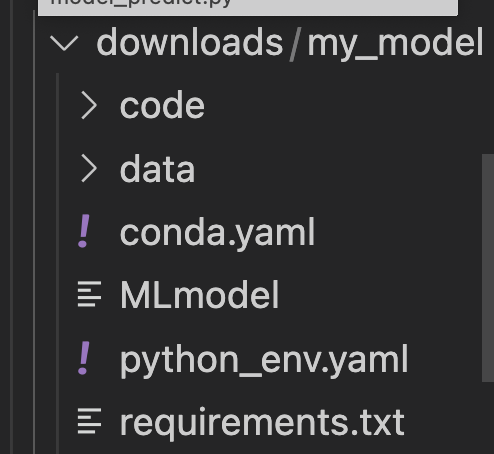
    mlflow.artifacts.download_artifacts(run_id=args.run_id, artifact_path=args.model_name, dst_path="./downloads")
다음 코드로 model에 필요한 모든 부분을 다운 받도록 합니다.
(myenv) (base) dinoqos@jangjeong-uui-MacBookAir section2 %  docker build -t model_predict
 -f batch_image.Dockerfile .
[+] Building 115.8s (13/13) FINISHED                                docker:desktop-linux
 => [internal] load build definition from batch_image.Dockerfile                    0.0s
 => => transferring dockerfile: 413B                                                0.0s
 => [internal] load metadata for docker.io/amd64/python:3.9-slim                    1.6s
 => [auth] amd64/python:pull token for registry-1.docker.io                         0.0s
 => [internal] load .dockerignore                                                   0.0s
 => => transferring context: 2B                                                     0.0s
 => [1/7] FROM docker.io/amd64/python:3.9-slim@sha256:51c781cd11dd1f2a95e2bef833a5  0.0s
 => [internal] load build context                                                   0.0s
 => => transferring context: 1.07MB                                                 0.0s
 => CACHED [2/7] WORKDIR /usr/app/                                                  0.0s
 => [3/7] RUN pip install -U pip &&    pip install mlflow==2.3.2 minio==7.1.15     96.6s
 => [4/7] COPY requirements.txt requirements.txt                                    0.1s
 => [5/7] RUN pip install -r requirements.txt                                      15.4s
 => [6/7] COPY downloads/ /usr/app/downloads/                                       0.0s
 => [7/7] COPY model_predict.py predict.py                                          0.0s
 => exporting to image                                                              1.9s
 => => exporting layers                                                             1.9s
 => => writing image sha256:646bf888921600e2f464666069356242671dcae1f189a95a33e148  0.0s
 => => naming to docker.io/library/model_predict                                    0.0s

What's Next?
  View a summary of image vulnerabilities and recommendations → docker scout quickview
(myenv) (base) dinoqos@jangjeong-uui-MacBookAir section2 % docker network ls
NETWORK ID     NAME                        DRIVER    SCOPE
d1c8c0c7a7fa   03_experiment_default       bridge    local
58e06af341bd   05_model_registry_default   bridge    local
a8a6be375619   06_batch_serving_default    bridge    local
615e3e80795a   bridge                      bridge    local
b0469949ba5a   host                        host      local
659d54bb76fd   none                        null      local
(myenv) (base) dinoqos@jangjeong-uui-MacBookAir section2 % docker run --network 06_batch_serving_default model-predict
Unable to find image 'model-predict:latest' locally
docker: Error response from daemon: pull access denied for model-predict, repository does not exist or may require 'docker login': denied: requested access to the resource is denied.
See 'docker run --help'.
(myenv) (base) dinoqos@jangjeong-uui-MacBookAir section2 % docker run --network 06_batch_serving_default model_predict
WARNING: The requested image's platform (linux/amd64) does not match the detected host platform (linux/arm64/v8) and no specific platform was requested
2024/03/01 12:30:24 WARNING mlflow.pyfunc: The version of Python that the model was saved in, `Python 3.7.6`, differs from the version of Python that is currently running, `Python 3.9.18`, and may be incompatible
/usr/local/lib/python3.9/site-packages/sklearn/base.py:318: UserWarning: Trying to unpickle estimator DecisionTreeClassifier from version 1.0.2 when using version 1.2.2. This might lead to breaking code or invalid results. Use at your own risk. For more info please refer to:
https://scikit-learn.org/stable/model_persistence.html#security-maintainability-limitations
  warnings.warn(
/usr/local/lib/python3.9/site-packages/sklearn/base.py:318: UserWarning: Trying to unpickle estimator RandomForestClassifier from version 1.0.2 when using version 1.2.2. This might lead to breaking code or invalid results. Use at your own risk. For more info please refer to:
https://scikit-learn.org/stable/model_persistence.html#security-maintainability-limitations
  warnings.warn(
(myenv) (base) dinoqos@jangjeong-uui-MacBookAir section2 % docker run -it --entrypoint /b
in/bash model_predict
WARNING: The requested image's platform (linux/amd64) does not match the detected host platform (linux/arm64/v8) and no specific platform was requested
root@1bfbbbc35117:/usr/app# ls
downloads  predict.py  requirements.txt
root@1bfbbbc35117:/usr/app# ls downloads
my_model
root@1bfbbbc35117:/usr/app#'Tech Stack > MLflow' 카테고리의 다른 글
| MLOps - FastAPI 서빙 (0) | 2024.03.04 |
|---|---|
| MLOps - 모델 저장 (1) | 2024.02.29 |
| MLOps - 데이터 (0) | 2024.02.27 |
| MLOps - 교차검증 (0) | 2024.02.23 |
| MLOps - HPO 반영 (0) | 2024.02.22 |


